Plans and limits
What each Enscale plan costs and includes, how usage is counted, and exactly what happens if you go over.
Five plans, all billed monthly. This page tells you which one you need, what counts against your allowance, and — the part people actually worry about — what happens when you hit a limit.
The short version: nothing gets deleted and your inbox never switches off. You're warned twice on the way up; at 100% automations pause immediately, while the inbox keeps working for a 24-hour grace period first.
Which plan do you need?
Pick based on how many customers message you per month, since that's the limit most stores hit first.
| If you… | Start on |
|---|---|
| Are just trying Enscale out | Free — 300 conversations, one channel, no card |
| Get up to ~100 customer conversations a day | Starter — $39/mo |
| Are running campaigns regularly and doing real volume | Growth — $79/mo |
| Have a support team and heavy automation | Pro — $149/mo |
| Are doing serious volume across many channels | Scale — $399/mo |
Everyone starts with 7 days of Starter free, no card. When it ends you drop to Free unless you pick a plan — you're never charged automatically.
Guessing is fine. You can change plan any time, and Settings → Billing shows your real usage against your allowance after a week or two, which is a much better basis than a guess.
What each plan includes
| Free | Starter | Growth | Pro | Scale | |
|---|---|---|---|---|---|
| Monthly price | $0 | $39 | $79 | $149 | $399 |
| Conversations / mo | 100 | 3,000 | 10,000 | 30,000 | 100,000 |
| Workflow runs / mo | 200 | 10,000 | 50,000 | 250,000 | 1,000,000 |
| Broadcast messages / mo | — | Unlimited | Unlimited | Unlimited | Unlimited |
| Channels | 1 | 5 | 10 | 15 | 25 |
| Seats | 1 | Unlimited | Unlimited | Unlimited | Unlimited |
| AI agents | — | $0.18 / resolution | $0.16 / resolution | $0.14 / resolution | $0.12 / resolution |
| Ad tracking (CTWA, Instagram, Facebook) | — | ✓ | ✓ | ✓ | ✓ |
| Review widget | ✓ | ✓ | ✓ | ✓ | ✓ |
Three things people misread in this table:
- Channels is a combined count. Five channels means five connections in total across WhatsApp, Instagram and Facebook in any mix — not five of each.
- Seats are unlimited on every paid plan. Adding your whole team costs nothing extra.
- There's no contact limit, on any plan including Free. You are never charged for storing customers.
How usage is counted
Four things are measured. Only the first two commonly run out.
| What's counted | One of these is… | What happens at the limit |
|---|---|---|
| Conversation | One 24-hour window of messaging with one customer, on one channel. | Inbox becomes reply-read-only after a grace period. |
| Workflow run | One automation running start to finish, however many steps. | Automations and campaign sending pause. |
| Broadcast message | One campaign message to one person. | Only capped on Free (where campaigns are off anyway). |
| AI resolution | A conversation the AI solved and closed without a human. | Nothing pauses — you're charged per resolution instead. |
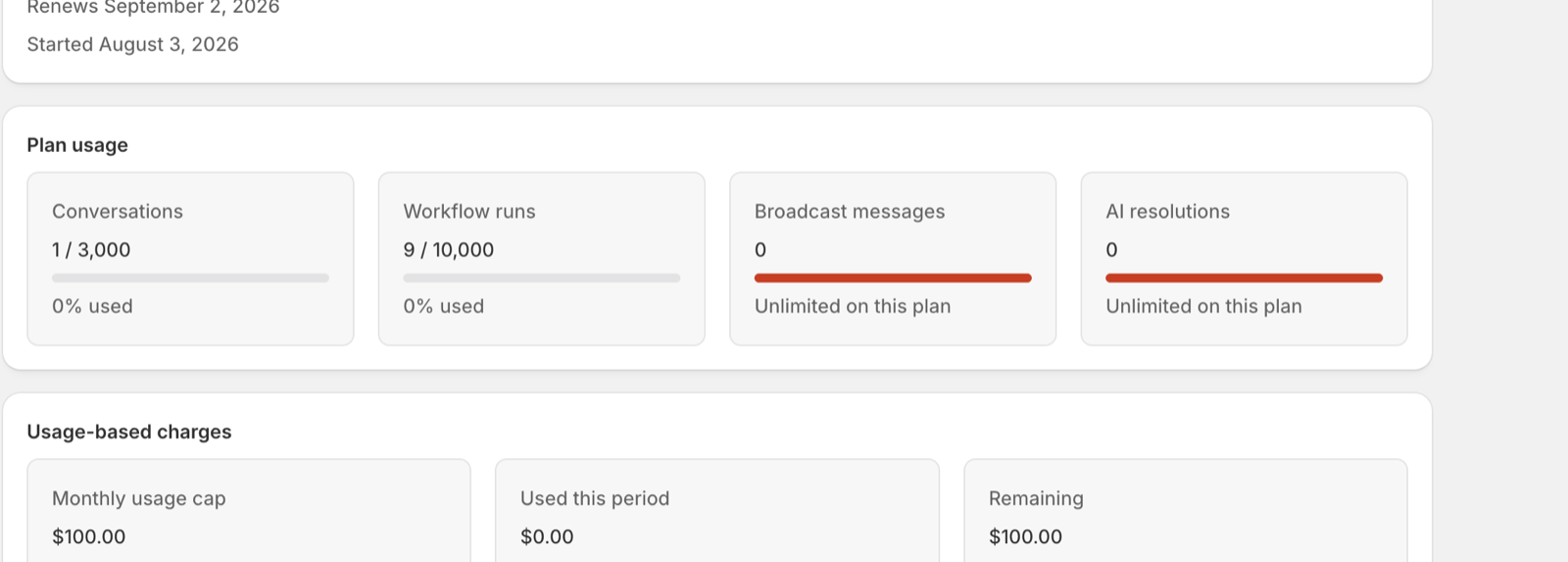
Conversations, in practice
This is the one worth understanding properly, because it's not "per message" and it's not "per customer".
A conversation is a 24-hour window. So:
- A customer messages you on WhatsApp at 10am and you reply at 11am → 1 conversation.
- You go back and forth 40 times that afternoon → still 1 conversation.
- The same customer messages again two days later → 2nd conversation.
- That same customer also DMs you on Instagram → that's a separate channel, so its own window.
Which means a chatty customer costs you the same as a one-line one. Volume of people, not volume of messages, is what moves this number.
Workflow runs
One run is one automation firing, no matter how big it is. A twelve-step abandoned-cart sequence and a two-step order notification each count as 1.
AI resolutions
These don't run out — they're charged per use instead, at your plan's rate. See AI usage and spend for controlling that spend.
When your month resets
Your allowances reset on the 1st of the calendar month. Same for every store.
This deliberately doesn't line up with your Shopify billing date, which runs on its own rolling 30-day cycle. The two will never match, and that's expected — if you install on the 20th, your first Enscale month is 11 days long.
What happens when you hit a limit
Enscale warns you at 80% and again at 100%. What happens at 100% is deliberately different for automations and for conversations.
| When | What happens |
|---|---|
| 80% used | Email and in-app warning. Everything keeps running. |
| 100% used | Urgent notification and an upgrade prompt. Automations stop immediately; the inbox enters a short grace window. |
Automations stop immediately
When your workflow-run allowance is exhausted, workflow runs and campaign sending pause right away — there is no grace window. This is intentional: automations are the part of Enscale that can quietly rack up spend, so cutting them off at the cap means nothing keeps running (and nothing keeps costing) after you've hit your limit.
The one exception is overage: if you've opted into workflow overage, runs carry on past the cap and are billed per run instead of pausing.
Conversations get a 24-hour grace window
When your conversation allowance is exhausted, the inbox stays fully writable for 24 hours before going reply-read-only. A hard cutoff would strand customers mid-thread, so you get a day to upgrade or clear the backlog first.
| If you run out of… | At 100% | After the grace window |
|---|---|---|
| Workflow runs | Automations and campaign sending pause immediately (no grace) | — |
| Conversations | Your inbox stays writable for 24 hours | Your inbox becomes reply-read-only |
Running out of one does not affect the other. If you've opted into conversation overage, the inbox keeps sending past the cap and is billed per conversation instead of going read-only.
What never stops, whatever happens
Even at a hard limit, on any plan:
- Reading conversations and full message history
- Viewing contacts and segments
- Viewing your usage and billing
- Upgrading
You will never lose access to your customer data because of a usage limit.
Keep running instead of pausing (overage)
If you'd rather pay a little than have things stop, turn on overage. You're then charged per unit past your allowance instead of pausing.
| Starter | Growth | Pro | Scale | |
|---|---|---|---|---|
| Per extra workflow run | $0.005 | $0.004 | $0.003 | $0.002 |
| Per extra conversation | $0.00199 | $0.00179 | $0.00149 | $0.00119 |
Both switches are off by default — you'll never be charged for overage without turning it on yourself. They're independent, in Settings → Billing, so you can enable one and not the other.
When it's a good idea: a Diwali or Black Friday spike, where having your order notifications pause mid-rush would cost you far more than a few dollars of overage.
When it isn't: every single month. If you're consistently over, the next plan up is cheaper than the overage. The billing page tells you when that's true.
Overage shares one spending cap with your AI charges — see the Shopify usage cap.
Choosing or changing your plan
Plan selection runs on Shopify's own secure plan page. Choosing a plan, upgrading, or downgrading from Settings → Billing opens that hosted page, where Shopify shows the current prices and handles the charge approval. There is no separate Enscale checkout — the plan and its price are confirmed on Shopify, and the change syncs back to Enscale automatically.
Common questions
Next steps
- Billing and usage — how charges actually appear on your Shopify invoice.
- AI usage and spend — the one genuinely variable cost.
- Settings reference — where to change these options.