Billing and usage
How Enscale charges work — what's on your Shopify invoice, what Meta bills separately, and the cap that stops surprises.
Your Enscale bill has up to three parts:
- Your plan — a fixed monthly charge.
- Usage charges — AI resolutions, plus overage if you turned it on.
- Nothing else from us. Meta's WhatsApp fees are billed by Meta, straight to you.
For what each plan costs and includes, see Plans and limits. This page is about how the charging actually works.
Everything goes through Shopify
Enscale bills entirely through Shopify. Charges appear on your Shopify invoice alongside your other apps — there's no separate Enscale invoice and no card stored with us.
Choosing or changing a plan happens on Shopify's own hosted plan page, opened from Settings → Billing. Shopify shows the current prices there and handles the charge approval; the change then syncs back to Enscale.
That also means Shopify's rules apply, including the usage cap described below.
AI resolution charges
AI agents are charged per use rather than capped. You pay at your plan's rate:
| Plan | Per AI resolution |
|---|---|
| Starter | $0.18 |
| Growth | $0.16 |
| Pro | $0.14 |
| Scale | $0.12 |
You're charged only when all three of these are true:
- The AI handled the conversation, and
- the AI marked it resolved, and
- no human took over first.
If one of your team picks the conversation up, it isn't an AI resolution and you aren't charged. Conversations auto-closed after 24 hours of silence aren't charged either.
Handovers are always free, which is why it's worth letting your agents escalate freely. See AI usage and spend.
Voice notes and images cost more
A resolution where the AI handled audio or an image costs an extra $0.032. Those take meaningfully more work to process, so it's passed through rather than averaged into everyone's base rate.
Credit bundles
If you buy an AI credit bundle, resolutions come out of the bundle first, then bill at your standard rate once it's used up. Bundle credits don't roll over past their period.
Overage charges
Off by default. When you turn it on, work continues past your allowance instead of pausing, and you pay per unit.
| Starter | Growth | Pro | Scale | |
|---|---|---|---|---|
| Per workflow run | $0.005 | $0.004 | $0.003 | $0.002 |
| Per conversation | $0.00199 | $0.00179 | $0.00149 | $0.00119 |
Workflow and conversation overage are separate switches in Settings → Billing — enable either, both, or neither.
When it's a good trade: a seasonal spike where having your order notifications pause mid-rush would cost you far more than a few dollars.
When it isn't: every month. If you're consistently over, the next plan up is cheaper than the overage — and the billing page will tell you when that's the case.
The Shopify usage cap
Every metered charge — AI resolutions and overage both — draws from one cap. It's a hard ceiling on what Enscale can charge you in a period.
| Plan | Default cap |
|---|---|
| Starter | $100 |
| Growth | $200 |
| Pro | $300 |
| Scale | $500 |
You're notified as you approach it. When you hit it, metered charges stop — which means AI resolutions and overage stop too, because Enscale can no longer bill for them.
You can raise it from your Shopify subscription, and Shopify requires you to approve any increase — so it can never rise without you knowing. This is what makes AI spend genuinely safe: it cannot run away from you.
Your Shopify usage cap resets on Shopify's own cycle, while your Enscale allowances reset on the 1st of the calendar month. These two dates will not match, and that's expected. See Plans and limits.
Meta's WhatsApp fees are a separate bill
Meta bills you directly through your connected WhatsApp Business account. Enscale never sees or marks up these charges.
The two count differently, which trips people up:
- Enscale counts one campaign message per recipient.
- Meta charges per delivered message, priced by the recipient's country and your template's category.
So a 1,000-recipient campaign is always 1,000 Enscale campaign messages. What Meta charges depends on where those people are and whether your template is marketing or utility.
Before you send, Enscale shows you the template category, how many people are eligible, how many are being skipped, and an estimated Meta charge range where available. See Meta template charges.
Where to look
Settings → Billing shows your plan and cycle, usage meters for conversations, workflow runs and campaign messages, your AI resolution count and projected charge, any bundle balance, your overage switches, and your remaining Shopify cap.
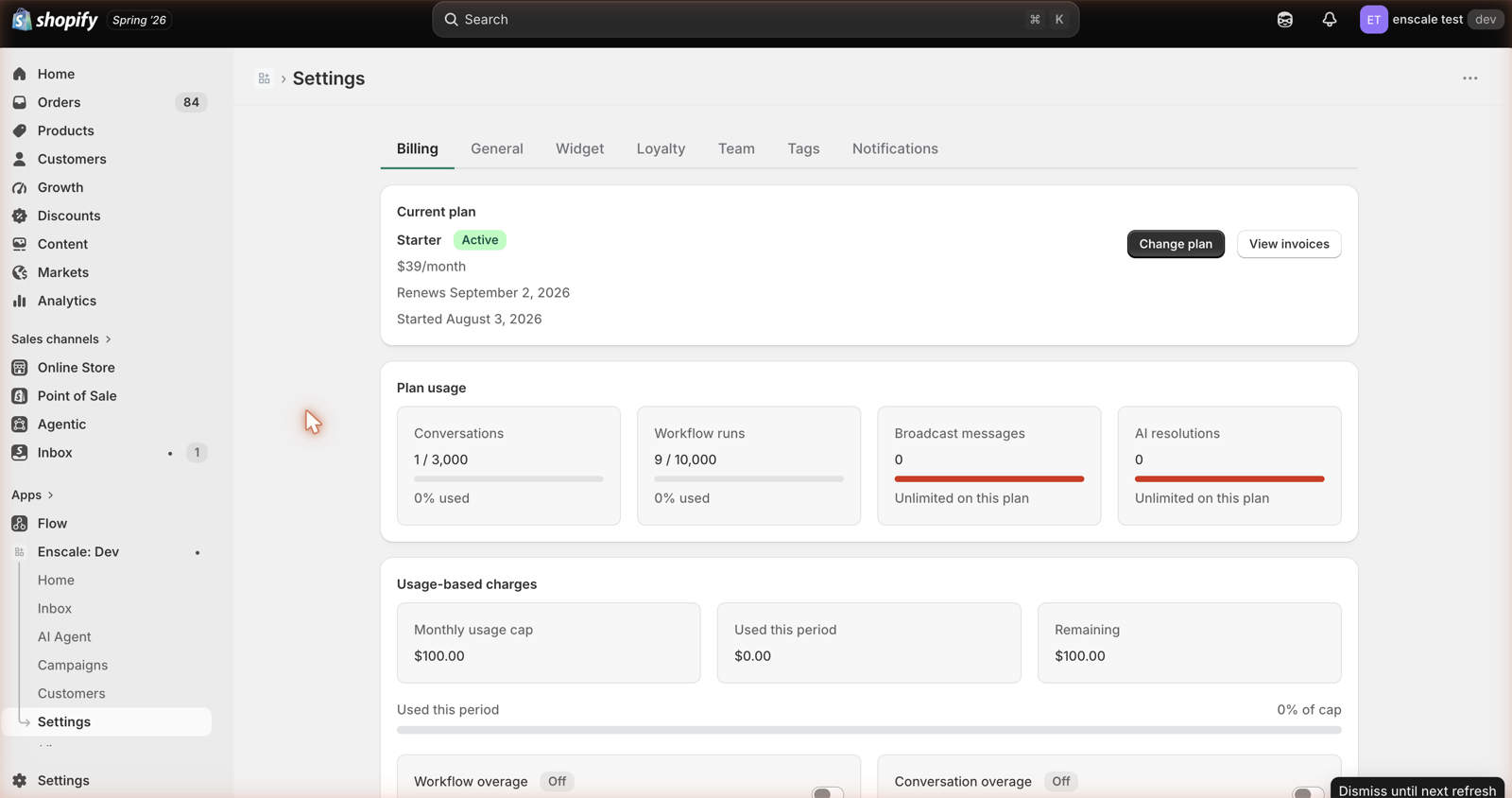
Meters turn amber at 80% and red at 100%.
If your subscription lapses
A cancelled, expired or non-renewing subscription drops you to Free entitlements immediately.
Your data is untouched — contacts, conversations, automations and reviews all stay exactly where they are. Resubscribing restores your limits.
Common questions
Next steps
- Plans and limits — allowances and what happens at a limit.
- AI usage and spend — the one variable cost.
- Meta template charges — the separate Meta bill.