Reviews
Ask for reviews over WhatsApp instead of email, then show them on your product pages with verified-purchase badges.
Enscale collects reviews, imports the ones you already have, lets you moderate and reply, and displays them on your storefront.
The reason it works better than what you're using now: review requests sent by email mostly go unopened. The same request on WhatsApp gets read. Same customers, same products, several times the reviews.
Review collection is on every plan, including Free.
Ask for reviews after delivery
The flow that does it:
Trigger: Fulfillment Updated
  → Condition: shipment status is "delivered"
  → Wait 2 days
  → Fetch review link
  → Template Message with the link
Full walkthrough: Build your first workflow.
Always use Fetch review link
The Fetch review link step creates a link tied to that specific customer and that specific product. A review left through it is marked verified purchase and can carry a badge on your storefront.
Don't link to a generic review form instead. Verified reviews carry considerably more weight with shoppers, and the badge is only possible when the link proves the purchase happened.
When to ask
Two days after delivery is a sensible default, but match it to what you sell:
| What you sell | Ask after |
|---|---|
| Consumables, things with instant value | 2–3 days |
| Clothing | 5–7 days — they need to have worn it |
| Anything needing setup or assembly | 10–14 days |
Ask too early and you get "haven't tried it yet". Ask too late and they've forgotten you.
Bringing existing reviews with you
You can import from Judge.me or Loox, keeping the rating, text, author, product, date, photos and verified status.
Import before you switch your storefront widgets over
A product page that showed 40 reviews yesterday and zero today reads as something being broken, and it will cost you sales while you sort it out.
Import first, check the counts look right, then switch the display.
Reviews are matched to your Shopify products during import. Anything that can't be matched is reported back to you rather than silently dropped, so you can fix it.
Moderation
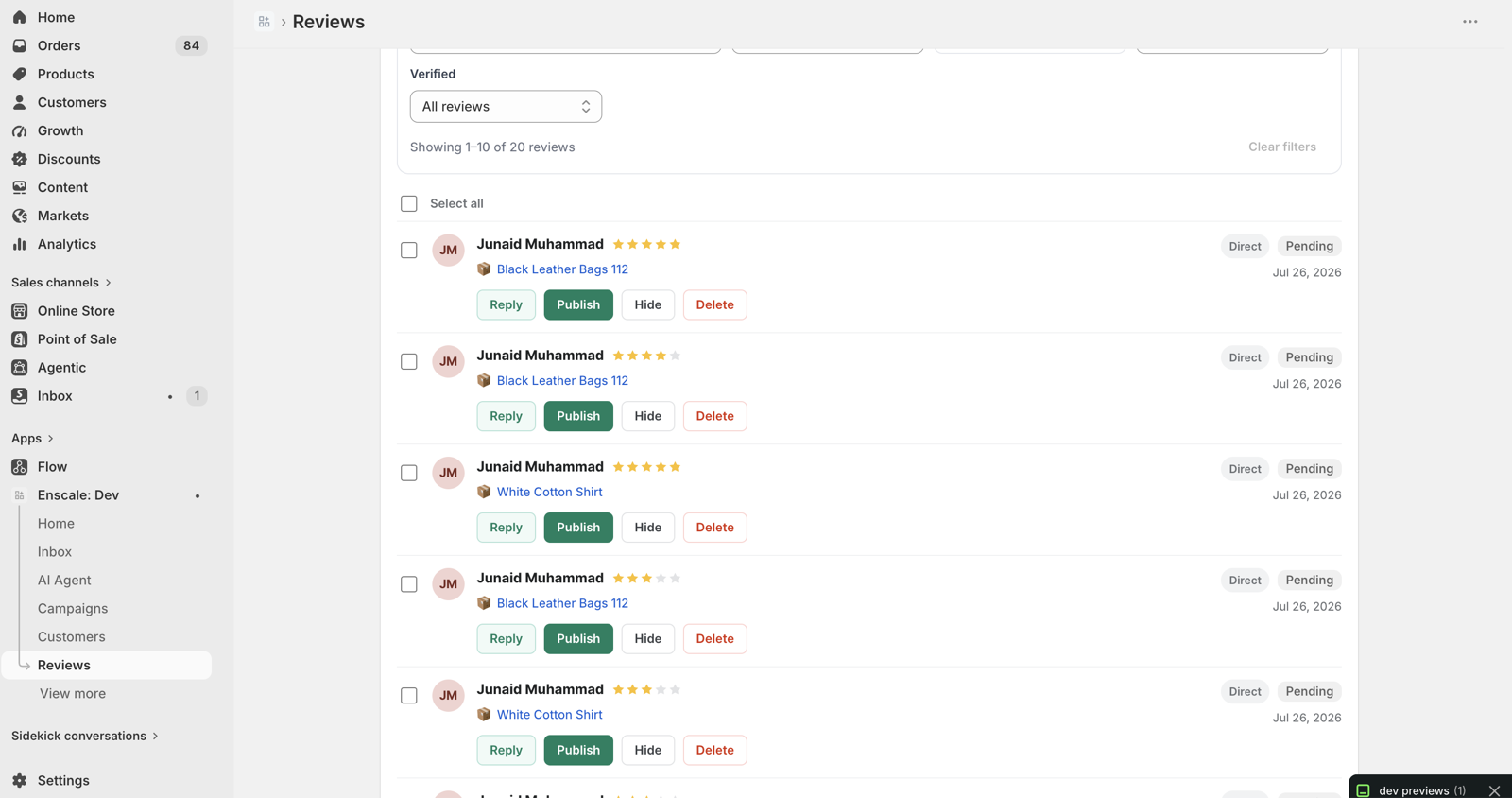
New reviews are held as Pending and go live when you approve them.
| Status | Means |
|---|---|
| Pending | Waiting for you. Not on your storefront. |
| Published | Live. |
| Rejected | Not shown. |
Auto-approve
Turn this on so you're not approving every 5-star review by hand:
| Setting | Default | What it does |
|---|---|---|
| Enabled | Off | Master switch |
| Minimum rating | 4 | Anything below this waits for you |
| Verified only | Off | Only auto-publish confirmed purchases |
Auto-approve is not a filter — and don't use it as one
Setting a minimum rating means low ratings wait for your attention. It does not mean they're hidden. You still need to publish them.
Showing only positive reviews while implying you show all of them is deceptive, and unlawful in a lot of places. Moderation exists for spam, abuse and duplicates — not for burying low scores. Enscale won't help you do that.
And you shouldn't want to. A wall of nothing but five stars reads as fake, and shoppers know it. A three-star review with a good reply underneath often converts better than no negative reviews at all, because it proves the rest are real.
Replying
Reply to any review from the review management page. Your reply shows publicly underneath it.
Reply to every review under four stars. It's your only opportunity to give your side of the story to every future shopper who reads that page — and there will be many more of them than the one person who complained.
Putting reviews on your storefront
These come from the same theme embed as the chat widget — see Webchat widget if you haven't enabled it.
| What it is | Where it goes |
|---|---|
| Product review widget | The full review list on a product page |
| Star rating badge | Stars on product and collection cards |
| Write-a-review form | Lets customers submit directly |
| Review carousel | Featured reviews, anywhere you want them |
Configure the look in Settings → Widget — layout, sort order, how many per page, colours, and which bits show. See Settings reference.
Why your collection pages stay fast
Enscale writes your review average and count into Shopify's own product data, which your theme reads directly.
That means star ratings on collection pages need no Enscale script at all — nothing extra loading, nothing slowing your grid down. It also feeds Google's rich results, so your star ratings can show in search listings if your theme supports it.
Only published reviews count towards these numbers.
The automation worth building
The Review Submitted trigger tells you the rating, so you can respond differently to a delighted customer and an unhappy one:
Trigger: Review Submitted
  → Condition: is the rating 4 or more?
      → Yes: thank them, award loyalty points
      → No:  tag "service-recovery", assign to a person
Routing low ratings to a human before they harden into a public complaint is one of the highest-value automations in Enscale. A customer who's annoyed but heard from within the hour often revises their review. One who's ignored for three days writes about you elsewhere.
You can also award loyalty points for leaving a review, which measurably increases how many you get.
Common questions
Next steps
- Loyalty — rewarding people who review.
- Workflows — building the request flow.
- Integrations — importing from Judge.me and Loox.