Webchat widget
Put a chat bubble on your Shopify storefront so browsing customers can ask before they abandon.
The webchat widget is the chat bubble in the corner of your store. Someone browsing a product page can ask "does this ship to Pune?" without leaving, and the conversation lands in the same inbox as everything else.
It's the fastest channel to set up — no Meta account, no approvals, no 24-hour rule. If you want to see Enscale actually working within five minutes, start here.
Install it
Open Widget installation in Enscale
Go to Widget installation. It takes you into your Shopify theme editor.
Turn on the app embed
In the theme editor, open App embeds and switch the Enscale embed on.
There's no code to paste. Enscale stores your chat settings in your shop's own data during install, and the embed reads from there — so when you change a setting later, nothing needs reinstalling.
Save and look at your store
Save the theme, then load your storefront. The chat bubble should be in the corner.
Send yourself a test message
Start a chat from your own storefront and confirm it reaches your inbox. Reply from Enscale and check the reply appears in the bubble.
Turning on the app embed changes your live theme immediately. If you'd rather test first: duplicate your theme, enable the embed on the duplicate, preview it, and publish when you're happy.
Make it look like your store
Configure it in Settings → Widget.
| Setting | What it does |
|---|---|
| Accent colour | The bubble and chat header colour. Match your brand. |
| Position | Which corner it sits in. |
| Show on pages | Which pages display it. |
A note on "Show on pages": it's tempting to put it everywhere, but the bubble earns its keep on product and collection pages, where people have questions that stop them buying. On your blog it's mostly noise.
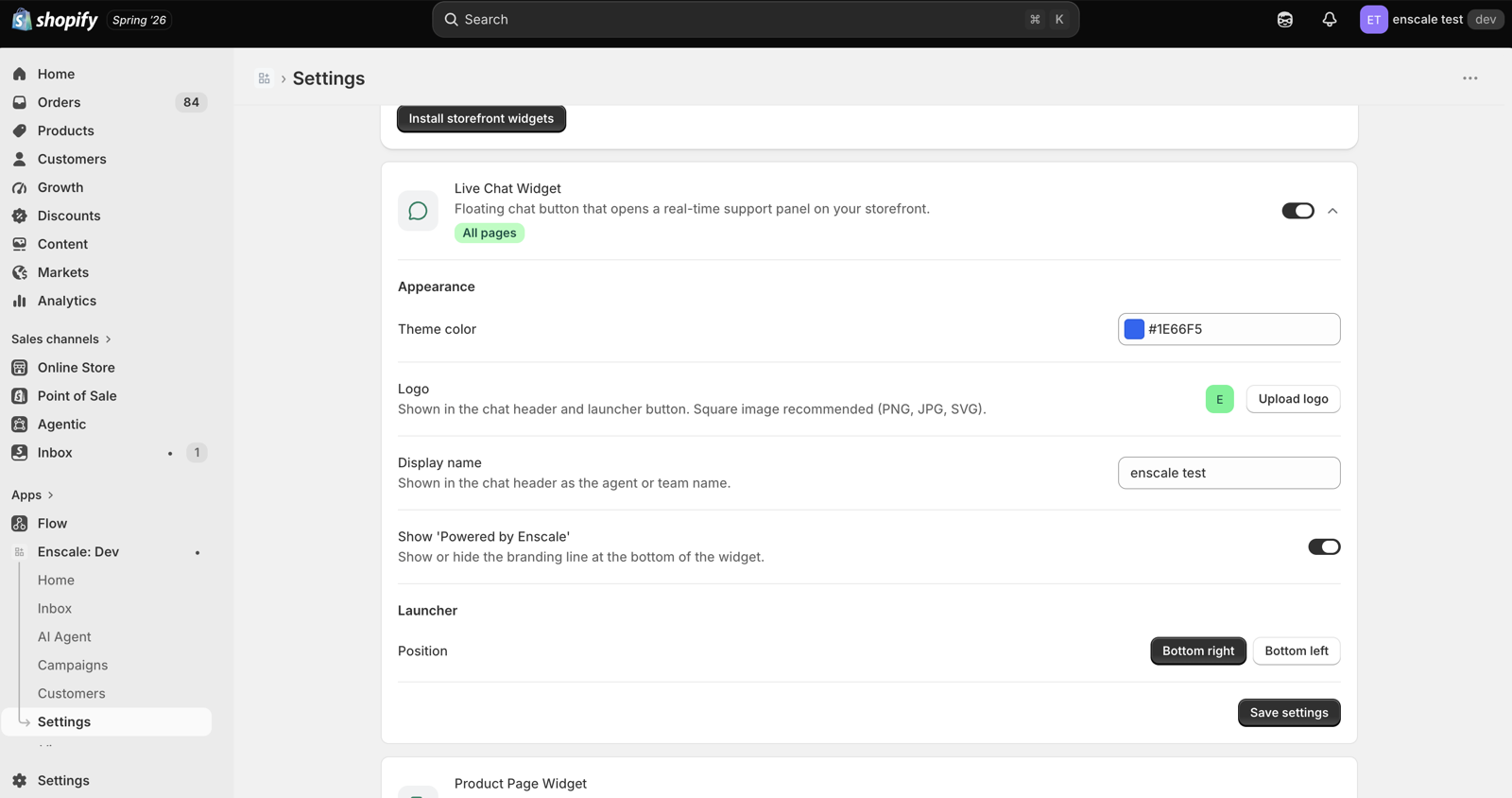
Widget settings
Accent colour, position, and which pages show the bubble.
The one big difference from WhatsApp
| Webchat | WhatsApp / Instagram / Facebook | |
|---|---|---|
| 24-hour rule | None | Yes |
| Approved templates needed | No | Yes, for WhatsApp outbound |
| Who you're talking to | Anonymous until they tell you | Their phone or social account |
| Can you reach them later? | Only while their tab is open | Yes, within the rules |
That last row is the thing to design around. A webchat visitor who closes the tab is gone — you have no phone number, no email, no way to follow up.
Which makes webchat the best place in your store to capture a contact. An AI agent or an automation can ask for a phone number mid-conversation and record WhatsApp consent at the same time, turning an anonymous browser into someone you can message next week.
That single move — capture the number in chat — is usually worth more than the chat conversation itself.
Why AI agents belong here
Webchat is where AI agents pay for themselves fastest.
Storefront visitors ask the same handful of pre-sale questions over and over: is this in stock in medium, how long does delivery take, can I return it, does it run small. These are exactly the questions an AI agent with your knowledge base answers well — factual, repetitive, and blocking a sale if nobody answers them.
The alternative is that the customer doesn't ask, and leaves. See AI agents.
Your review widgets use this too
The same theme embed also powers your storefront review displays — the review list on product pages, star ratings on collection cards, and the write-a-review form. If you've enabled the embed for chat, reviews are ready to configure in Settings → Widget.
See Reviews.
Common questions
Next steps
- AI agents — the highest-value thing to point at webchat.
- Reviews — the other half of the theme embed.
- Channels overview — how webchat compares.