AI agents
Let AI answer the repetitive questions — sizing, shipping, order status — and pass anything real to you.
An AI agent answers customer questions on its own and passes the rest to you. It's not a chatbot with canned replies: it reads from your own store information and looks up real order data.
Is this worth turning on?
Yes, if you're answering the same handful of questions all day — does this ship to my city, is this in stock in medium, where's my order, can I return this. That's most stores.
Probably not yet, if your volume is low enough that you comfortably answer everything yourself, or if your products need genuinely bespoke advice on every enquiry.
Available on all paid plans, charged per successful resolution — see what it costs below.
What an agent can actually do
- Answer from your own store information — shipping, returns, sizing, policies.
- Look up real Shopify data — order status, product details, stock levels.
- Recommend products.
- Collect details from customers, including WhatsApp consent.
- Add someone to a back-in-stock waitlist.
- Hand the conversation to you when it should.
That second one is what separates this from a chatbot. "Where's my order?" gets a real answer with the actual tracking status — not a link to a tracking page.
Where to switch it on first
Start with webchat. Storefront visitors ask the same pre-sale questions constantly, those questions are highly automatable, and the risk of a wrong answer is low — the worst case is a browsing visitor gets a vague reply.
WhatsApp is more valuable but higher stakes. That's usually existing customers with order problems, where a wrong answer costs you more.
Instagram and Facebook depend on your volume. A quiet Page may not be worth it.
Set one up
Fill in your store information first
An agent with nothing to read from will make things up or hand everything over. Do this before anything else — Knowledge base.
Choose what the agent is for
| Purpose | What it handles |
|---|---|
| Support | Order status, returns, shipping, policy questions |
| Sales | Pre-sale questions, recommendations, sizing |
| Knowledge | Answering from your documentation and FAQs |
| Custom | A role you define |
You can run more than one — a sales agent on webchat where people are browsing, and a support agent on WhatsApp where existing customers are asking about orders.
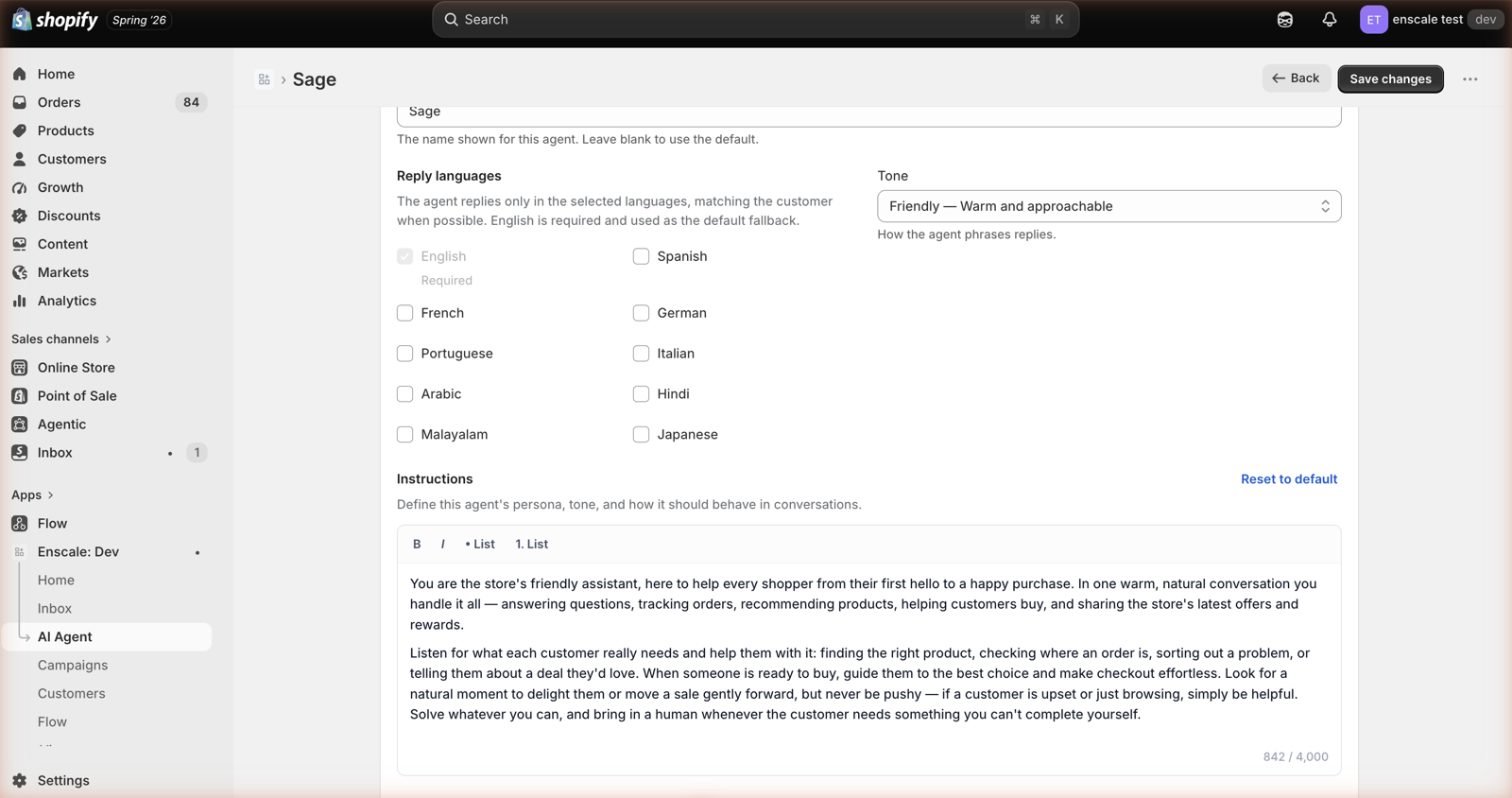
Write its instructions
This is where you set its behaviour and boundaries. See writing good instructions below.
Choose what it's allowed to look up
Order status, product details, stock, discounts. Turn on what you're comfortable with.
Set your handover rules
When must it fetch a human? See AI handover.
Test it properly, then go live
Ask it your five most common real questions, plus the awkward ones. See testing.
Writing instructions that work
Instructions control behaviour. Facts go in your knowledge base instead — putting facts in instructions means they're sent on every single request whether they're relevant or not.
Good instructions are specific, and mostly about what not to do:
Be concise — two or three sentences unless asked for more.
Never promise a refund, discount, or delivery date. Hand over instead.
If the customer seems frustrated, hand over rather than trying again.
If you don't know, say so and hand over. Never guess at policy.
Always hand over if the customer asks for a person.
Vague instructions do nothing
"Be helpful and friendly" constrains nothing — the AI was already going to try that. The instructions that earn their place are the ones that tell it where to stop.
Test it before you go live
Ask the questions your customers actually ask, including the ones you'd rather they didn't:
- Your top five real support questions. The ones you're tired of typing.
- The exceptions. "Can I return a sale item?"
- Something you deliberately haven't documented. It should hand over, not invent an answer. If it invents one, your instructions are too loose.
- Anything involving money. Must escalate.
- "I want to talk to a human." Must hand over immediately, with no further attempt.
The last two are the ones to be strict about. An agent that trades slightly worse answers for reliably escalating is the better agent.
What it costs
You're charged only when the AI solved the problem and closed the conversation itself.
| What happened | Charged? |
|---|---|
| AI solved it and closed it | Yes |
| It handed over to a human | No |
| A human took over | No |
| Auto-closed after 24h of silence | No |
Escalating is free — so tune towards escalating
Because handover costs nothing, there's no financial reason to make your agent stubborn. An agent that hands over too often costs you nothing extra. An agent that guesses at your refund policy costs you a customer.
Rates run from $0.18 down to $0.12 per resolution depending on plan, plus a small addition when audio or images were involved. See AI usage and spend.
When to use an automation instead
This is the most common mistake, and it costs real money.
Automations are predictable. The same trigger always sends the same message. Use them for anything you can anticipate: order confirmations, shipping updates, review requests. They cost nothing beyond your plan allowance.
AI agents handle the unpredictable — open-ended questions you couldn't have scripted.
So: don't pay an agent to do an automation's job. An order-status notification fired by a Shopify event is free and always correct. An AI agent answering "where's my order?" costs you a resolution and might get it wrong.
The two connect in two places:
- Assign to Agent hands a conversation to an AI agent mid-flow.
- AI Handed to Human starts an automation when an agent escalates.
Common questions
Next steps
- Knowledge base — what it answers from. Do this first.
- AI handover — getting escalation right.
- AI usage and spend — keeping the cost predictable.