Loyalty
Give repeat customers points on every order, redeemable for discounts, visible right in their Shopify account.
Customers earn points when they buy, and swap them for discounts later. They see their balance in their own Shopify account, with no separate login to remember.
Why bother
Repeat customers are the cheapest revenue you have. You've already paid to acquire them — the ad spend, the discount on their first order, the time answering their questions.
A points programme gives someone a concrete reason to come back to you instead of the competitor who's currently outbidding you on ads. The points only cost you anything when they're redeemed, and redemption means another order.
Loyalty is off by default. Turn it on in Settings → Loyalty.
Set it up
Decide what a point is worth
This is the only decision that really matters. Work backwards from the discount rate you're happy giving — the worked example below shows how.
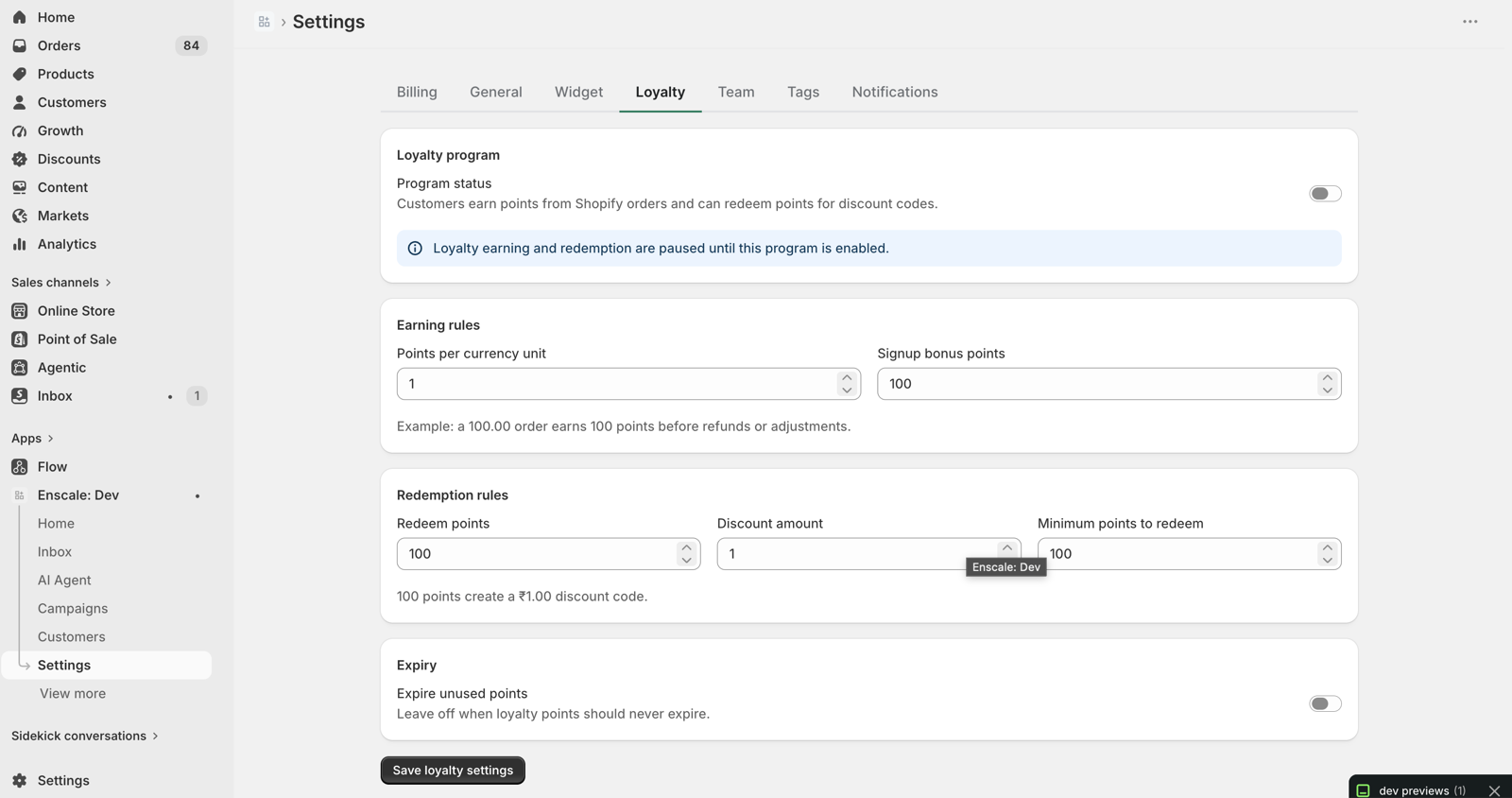
Turn it on in Settings → Loyalty
Enable the master switch and enter your earn rate and redemption values.
Tell your customers it exists
A programme nobody knows about changes nothing. See making it actually work below.
Worked example: building a 5% programme
You sell homeware, average order ₹2,000.
At the defaults — 1 point per ₹1 spent, 100 points redeems for ₹1 off — a customer spending ₹2,000 earns 2,000 points, worth ₹20. That's a 1% programme. Probably too small to change anyone's behaviour.
To make it 5%, you have two options that reach the same place:
| Option | Setting | Result on a ₹2,000 order |
|---|---|---|
| Award more points | 5 points per ₹1 | 10,000 points → ₹100 off |
| Make points worth more | 20 points redeems ₹1 | 2,000 points → ₹100 off |
Both give the customer ₹100. Pick the first one — awarding more points feels more generous, and "you've earned 10,000 points" reads better than "you've earned 2,000 points". The maths is identical; the psychology isn't.
What it costs you: 5% of revenue, but only on orders where points actually get redeemed — and every redemption is a customer placing another order.
All the settings
| Setting | Default | What it does |
|---|---|---|
| Enabled | Off | Master switch |
| Points per currency unit | 1 | How many points per ₹1 spent |
| Signup bonus points | 100 | One-off award for joining |
| Redeem points | 100 | Points needed for one redemption |
| Redeem amount | 1 | What that redemption is worth |
| Minimum redeem points | 100 | Balance needed before they can redeem at all |
| Points expire after | Never | Optional expiry, in days |
The redeem points and redeem amount pair together define your rate: the defaults mean 100 points is worth ₹1 off.
How points move
Every change is a ledger entry, so a balance is always explainable — you can see exactly which order or action caused each movement.
| Entry | When |
|---|---|
| Purchase earn | They place an order |
| Signup bonus | They join the programme |
| Redemption spend | They swap points for a discount |
| Refund reversal | An order is refunded, taking back the points it earned |
| Review reward | They leave a review |
| Manual adjustment | You change a balance by hand |
| Workflow adjustment | An automation awards or deducts points |
Refund reversal matters more than it sounds
Without it, a customer could order, earn points, refund the order, and keep the points — repeatedly. Enscale reverses them automatically, so you don't have to police it.
Redemption
A redemption turns points into a Shopify discount code.
| Status | Means |
|---|---|
| Created | The code exists and works |
| Used | Applied to an order |
| Cancelled | Cancelled before use |
| Expired | Ran out before being used |
Points leave the balance when the code is created, not when it's used. A customer who generates a redemption and never uses it has still spent those points.
If they come back confused about a missing balance, cancel the redemption — that returns the points.
Customers see it in their Shopify account
Enscale adds a loyalty block to the Shopify customer account page. Customers see their balance and what they can redeem without leaving your store and without a separate login.
That last part matters — loyalty programmes that need their own account are mostly ignored. See Admin extensions.
Making it actually work
Points do nothing if customers don't know they have them. Four things worth wiring up:
- Put the balance in your order confirmation. "You've earned 2,000 points on this order" is the cheapest reminder there is.
- Message them when they cross the redemption threshold. An automation that fires when someone can finally redeem something is a strong reason to come back.
- Reward reviews with points. Pair the Review Submitted trigger with a points adjustment — it lifts both your review count and your repeat rate.
- Show the balance in the inbox. Your team sees it on the contact sidebar, which is genuinely useful when handling a complaint. "I can see you've got ₹300 in points waiting" changes a conversation.
Point expiry — think carefully
Expiry is off by default. Turning it on makes points expire a set number of days after they're earned.
The case for it: expiry drives return visits, and stops you carrying an ever-growing liability of unredeemed points.
The case against: it generates complaints. A customer who discovers their points vanished feels cheated, and they're not wrong to.
If you enable it, warn people before it happens — a scheduled message, or a line in your regular messaging. Points that expire with warning are a nudge. Points that expire silently are a reason to stop shopping with you.
Common questions
Next steps
- Reviews — pairing reviews with point rewards.
- Admin extensions — the customer account block.
- Revenue attribution — checking it earns its keep.